

Cross-Origin Resource Sharing (CORS) is an HTTP-header based mechanism that allows a server to indicate any origins (domain, scheme, or port) other than its own from which a browser should permit loading resources. CORS also relies on a mechanism by which browsers make a "preflight" request to the server hosting the cross-origin resource, in order to check that the server will permit the actual request. In that preflight, the browser sends headers that indicate the HTTP method and headers that will be used in the actual request.
An example of a cross-origin request: the front-end JavaScript code served from https://domain-a.com uses XMLHttpRequest to make a request for https://domain-b.com/data.json.
For security reasons, browsers restrict cross-origin HTTP requests initiated from scripts. For example, XMLHttpRequest and the Fetch API follow the same-origin policy. This means that a web application using those APIs can only request resources from the same origin the application was loaded from unless the response from other origins includes the right CORS headers.
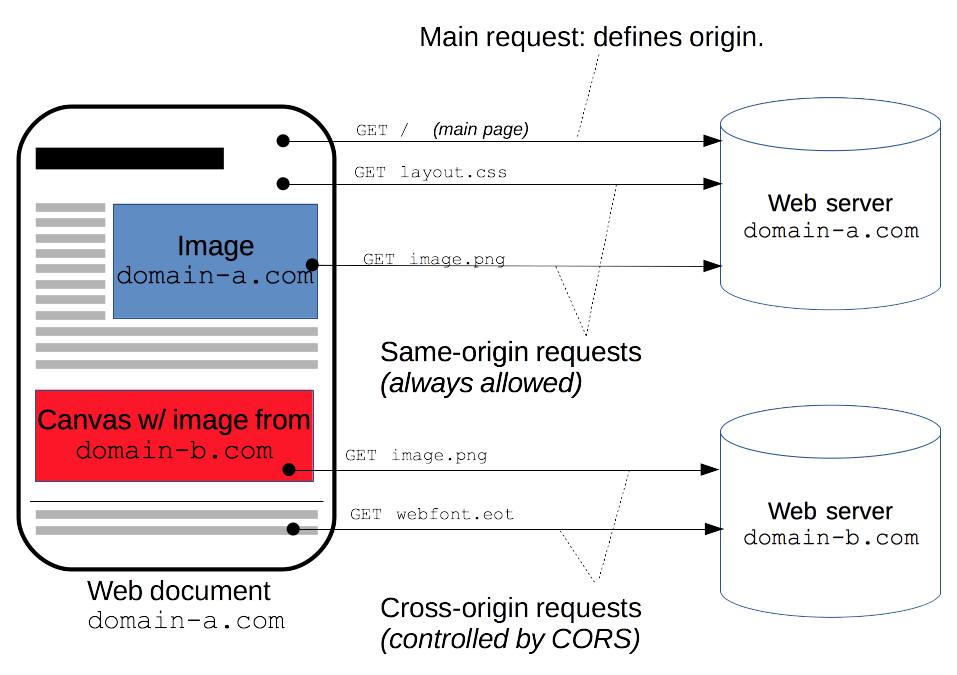
The CORS mechanism supports secure cross-origin requests and data transfers between browsers and servers. Modern browsers use CORS in APIs such as XMLHttpRequest or Fetch to mitigate the risks of cross-origin HTTP requests.
What requests use CORS?
This cross-origin sharing standard can enable cross-origin HTTP requests for:
- Invocations of the
XMLHttpRequestor Fetch APIs, as discussed above. - Web Fonts (for cross-domain font usage in
@font-facewithin CSS), so that servers can deploy TrueType fonts that can only be loaded cross-origin and used by web sites that are permitted to do so. - WebGL textures.
- Images/video frames drawn to a canvas using
drawImage(). - CSS Shapes from images.
This is a general article about Cross-Origin Resource Sharing and includes a discussion of the necessary HTTP headers.
Functional overview
The Cross-Origin Resource Sharing standard works by adding new HTTP headers that let servers describe which origins are permitted to read that information from a web browser. Additionally, for HTTP request methods that can cause side-effects on server data (in particular, HTTP methods other than GET, or POST with certain MIME types), the specification mandates that browsers "preflight" the request, soliciting supported methods from the server with the HTTP OPTIONS request method, and then, upon "approval" from the server, sending the actual request. Servers can also inform clients whether "credentials" (such as Cookies and HTTP Authentication) should be sent with requests.
CORS failures result in errors but for security reasons, specifics about the error are not available to JavaScript. All the code knows is that an error occurred. The only way to determine what specifically went wrong is to look at the browser's console for details.
Subsequent sections discuss scenarios, as well as provide a breakdown of the HTTP headers used.
Examples of access control scenarios
We present three scenarios that demonstrate how Cross-Origin Resource Sharing works. All these examples use XMLHttpRequest, which can make cross-origin requests in any supporting browser.
Simple requests
Some requests don't trigger a CORS preflight. Those are called simple requests, though the Fetch spec (which defines CORS) doesn't use that term. A simple request is one that meets all the following conditions:
- One of the allowed methods:
- Apart from the headers automatically set by the user agent (for example,
Connection,User-Agent, or the other headers defined in the Fetch spec as a forbidden header name), the only headers which are allowed to be manually set are those which the Fetch spec defines as a CORS-safelisted request-header, which are:AcceptAccept-LanguageContent-LanguageContent-Type(please note the additional requirements below)Range(only with a simple range header value; e.g.,bytes=256-orbytes=127-255)
Note: Firefox has not implemented Range as a safelisted request-header yet. See bug 1733981.
- The only type/subtype combinations allowed for the media type specified in the
Content-Typeheader are:application/x-www-form-urlencodedmultipart/form-datatext/plain
- If the request is made using an
XMLHttpRequestobject, no event listeners are registered on the object returned by theXMLHttpRequest.uploadproperty used in the request; that is, given anXMLHttpRequestinstancexhr, no code has calledxhr.upload.addEventListener()to add an event listener to monitor the upload. - No
ReadableStreamobject is used in the request.